Client & Support
Options Menu
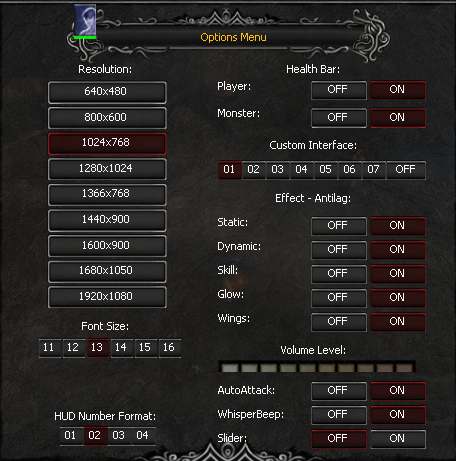
Options Menu Options Menu is the MU Europe client settings menu where you can customize the game to your preferences and optimize comfort and performance.…
Options Menu is the MU Europe client settings menu where you can customize the game to your preferences and optimize comfort and performance.
Through this menu, you can configure the interface appearance, graphics, and auxiliary client features.
What You Can Configure
- Game client resolution
- Interface font size
- Health bar (HP Bars) display
- AntiLag features to improve performance
- Other gameplay and interface parameters
How to Open the Options Menu
Press the ESC key on your keyboard.
In the menu that appears, select Options.