Client & Support
Especial Menu
Especial Menu Especial Menu is a separate MU Europe menu that provides quick access to important game features and information. It allows you to conveniently…
Especial Menu is a separate MU Europe menu that provides quick access to important game features and information. It allows you to conveniently manage resources, check event and invasion timers, view rankings, and use additional features.
In simple terms, it’s a “control center”: open it and immediately see what you would normally have to search for in multiple different windows.
How to Open the Especial Menu
Method 1 - ESC Button
Press the ESC button
Method 2 - Menu Button / U Key
You can click the Menu button in the bottom-right corner of the screen.
Hotkey: U.
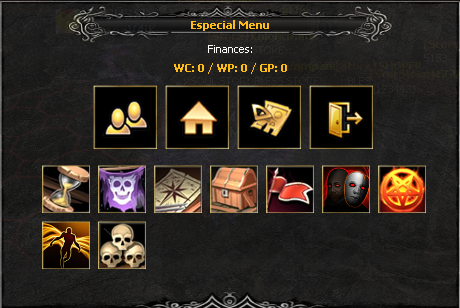
What’s Inside the Menu
Useful Information
- View your resources / credits
Quick Access
- Access important game features without extra windows
- Convenient navigation through server systems
- Save time when checking events